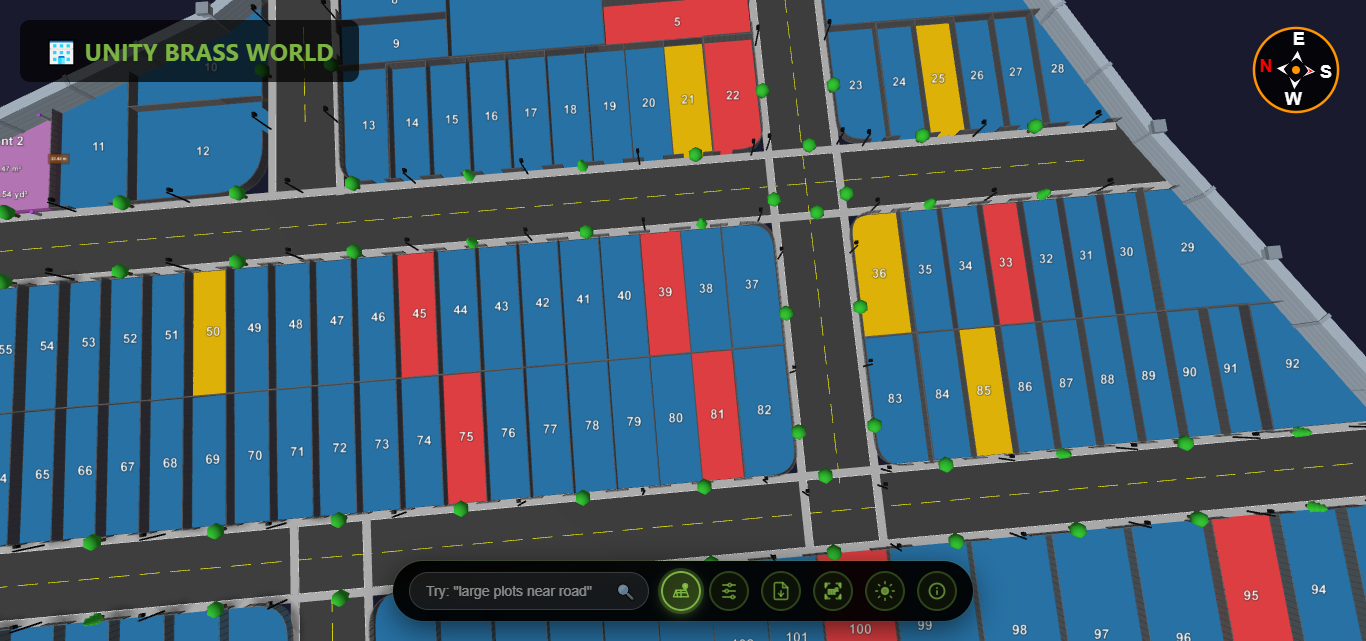
You have a land plot layout on paper or in a PDF file. Your buyers can't understand it. They keep asking you to explain what's where, how big each plot is, and which plots face the road. You end up driving them to the site 3-4 times before they finally get it.
What if you could convert that PDF map to 3D — and let buyers explore the entire layout themselves, from their phone, in under 30 seconds?
That's exactly what this guide will show you. No expensive software. No technical skills. No CAD expertise. Just upload your PDF and get an interactive 3D plot visualization that you can share with anyone.
What Does "Convert PDF Map to 3D" Actually Mean?
When we say convert PDF map to 3D, we mean transforming a flat, static 2D plot layout — the kind you print on paper or email as a PDF — into an interactive 3D model that people can:
- Rotate — view the layout from any angle (top, side, bird's eye)
- Zoom — get close to individual plots or see the full layout
- Measure — click any two points to get exact distances
- Identify plots — see plot numbers, road names, and boundaries clearly
- Check availability — see which plots are available, sold, or reserved
The result looks like a live 3D map that works in any browser — no app download, no software installation. Buyers simply click a link and explore.
This is completely different from generic PDF to 3D model converters that output CAD files (OBJ, STL, glTF). Those tools are designed for engineers and architects. What builders, developers, and brokers need is a visual, shareable, buyer-friendly 3D plot view — and that's what Plotex provides.
Why Should You Convert Your PDF Map to 3D?
If you're a builder, developer, or broker selling plots in India, converting your PDF map to 3D solves your five biggest problems:
1. Buyers Can't Read 2D Maps
Most buyers are not engineers. When they see a flat PDF with boundary lines, plot numbers, and scale measurements, they don't understand it. They need you to explain everything — and even then, they forget by the time they reach home. A 3D view makes the layout instantly understandable to anyone. Learn more about how difficult it is to read traditional plot maps.
2. You're Losing Remote Buyers
NRI buyers, out-of-city investors, and busy professionals can't visit your site every weekend. A PDF attachment on WhatsApp doesn't excite them. But a 3D plot link they can explore on their phone? That keeps them engaged and moves them toward a decision.
3. Too Many Site Visits
Every site visit costs you time, fuel, and effort. When buyers can explore the layout in 3D first, they arrive at the site already knowing which plots they want. The visit becomes a confirmation, not a discovery. Developers using 3D views report 50-70% fewer site visits.
4. Your Competitors Are Doing It
Builders across India are switching from PDF maps to 3D views. If your competitor shows an interactive 3D layout while you're still emailing PDFs, you're losing deals to a better presentation — not a better product.
5. Paper Maps Get Lost and Damaged
Physical maps fade, tear, and get outdated every time a plot is sold. A digital 3D map is always up-to-date, always accessible, and never gets lost. See why digital 3D maps outperform traditional paper maps in every way.

How to Convert PDF Map to 3D: Step-by-Step
Here's exactly how to convert your PDF map to 3D using Plotex. The entire process takes under 5 minutes from your side.
Prepare Your PDF Map
Gather your plot layout map. It can be:
- A PDF file from your architect, surveyor, or town planner
- A scanned copy of a paper map (saved as PDF)
- A photo of your paper map (clear, well-lit, saved as PDF)
The map should show plot boundaries, plot numbers, road positions, and basic dimensions. It doesn't need to be perfectly clean — as long as the layout is readable.
Upload on Plotex
Go to plotex.in and fill in the upload form:
- Enter your name, email, and phone number
- Click "Browse Files" or drag-and-drop your PDF
- Hit "Get 3D View"
That's it from your side. The upload takes seconds, even on slow connections.
Receive Your 3D Link
The Plotex team processes your PDF and builds an interactive 3D model of your plot layout. You receive a shareable link hosted at unity.plotex.in. This link includes:
- Full 3D plot layout with accurate boundaries
- Plot numbering and road labels
- Color-coded availability status (available/sold/reserved)
- Built-in measurement tools
- Works on every device — desktop, tablet, mobile
Share and Start Selling
Share the 3D link with buyers:
- WhatsApp — paste the link in any chat
- Email — add it to your email signature or inquiry replies
- Website — embed it on your project page
- Social media — post it on Facebook, Instagram, or LinkedIn
- Property portals — include it in your online listings
Buyers click the link and explore your plots in 3D — no app download needed.
What Your 3D Plot Map Looks Like
After you convert your PDF map to 3D, your buyers see an interactive 3D environment where they can:
| Feature | Your Old PDF | Your New 3D View |
|---|---|---|
| Plot boundaries | Flat lines, hard to distinguish | 3D raised boundaries, clearly visible |
| Plot numbers | Small text, often unreadable | Large, clear labels in 3D space |
| Measurements | Need ruler + scale calculation | Click any two points for instant distance |
| Roads | Lines with width labels | Visible 3D roads with realistic width |
| Availability | Not shown, must call to ask | Green = available, Red = sold, Yellow = reserved |
| Viewing angle | Top-down only | Rotate 360 degrees, zoom in/out |
| Sharing | PDF attachment (often ignored) | One-click link (opens instantly) |
| Device support | Needs PDF reader app | Works in any browser, any device |
Explore the difference yourself: see our detailed comparison of 3D plot view vs PDF maps.
Who Needs to Convert PDF Maps to 3D?
Real Estate Developers and Builders
You have township layouts with 50-500+ plots. Your architects give you PDFs. Your sales team prints them. Your buyers can't understand them. Convert those PDFs to 3D and give every buyer an interactive link they can explore from home. Learn how Plotex works for builders and developers.
Real Estate Brokers and Agents
You handle multiple projects from different builders. Each one gives you a PDF layout. Instead of carrying printouts to every meeting, share 3D links on WhatsApp and let clients explore on their own. It makes you look professional and closes deals faster. See how Plotex helps brokers.
Land Surveyors and Town Planners
You create the original survey maps. When you deliver a 3D visualization alongside the traditional PDF, you add premium value to your service. Builders will pay more for survey data they can directly use for marketing.
Individual Plot Sellers
Selling a single plot or a few plots? A 3D view makes your listing stand out on property portals and social media. When every other listing shows a flat image, yours shows an interactive 3D experience. Read our guide on how to sell plots online with 3D visualization.
Plotex vs Other PDF to 3D Tools
You might wonder: why not use generic PDF to 3D converters like Planner 5D, Coohom, or CAD software? Here's the difference:
| Feature | Generic PDF to 3D Tools | Plotex |
|---|---|---|
| Designed for | Floor plans, buildings, interiors | Land plot layouts specifically |
| Output | CAD files (OBJ, STL, DWG) | Shareable web link (no download needed) |
| Buyer can view? | Needs CAD software | Opens in any browser |
| Plot availability status | Not supported | Color-coded (available/sold/reserved) |
| Measurement tools | Only in CAD software | Built into the 3D viewer |
| Share via WhatsApp | Not possible (large files) | One-click link sharing |
| Technical skill needed | High (CAD knowledge required) | None (just upload PDF) |
| Cost | $20-200/month subscriptions | Free first conversion |
Plotex isn't a generic file converter — it's a plot visualization tool built specifically for Indian real estate. The output is designed for buyers to explore, not for engineers to edit.
What Types of PDF Maps Can Be Converted?
Plotex can convert virtually any plot layout PDF to 3D, including:
- Township layout plans — 50 to 500+ plots with roads and amenities
- Individual plot survey maps — single plots with boundary coordinates
- Government-approved site plans — TP scheme maps, NA plot layouts
- Architect-drawn layouts — CAD-generated PDFs with precise measurements
- Scanned paper maps — even hand-drawn survey sketches, as long as boundaries are visible
- Topographic survey maps — with contour lines and elevation data. See how topographic surveys convert to 3D
Tip: The clearer your PDF, the better the 3D output. Make sure plot numbers, boundary lines, and road positions are visible. If your paper map is faded, take a photo in good lighting and increase contrast before saving as PDF.
Frequently Asked Questions
Can I convert a PDF plot map to 3D for free?
Yes. Plotex offers free PDF to 3D plot conversion. Upload your PDF map on plotex.in, and the team converts it into an interactive 3D visualization. No software download, no subscription, and no technical skills required.
What types of PDF maps can be converted to 3D?
Plotex can convert land plot layout maps, township plans, survey maps, site plans, and any PDF showing plot boundaries and dimensions. Both scanned paper maps and digitally created PDFs are supported.
How long does it take to convert a PDF map to 3D?
The upload process takes under 2 minutes. The Plotex team then converts your PDF into an interactive 3D model. You receive your shareable 3D link typically within a short turnaround time.
Do buyers need to install any app to view the 3D plot?
No. The 3D plot visualization works directly in any web browser — Chrome, Safari, Firefox, or Edge. Buyers simply click the link and explore the plot in 3D on their phone, tablet, or desktop. No app download required.
Can I convert a paper map to 3D if I don't have a PDF?
Yes. Take a clear photo or scan of your paper map and save it as a PDF. Then upload it on Plotex. As long as the plot boundaries and numbers are visible, the team can convert it to 3D.
Is this the same as a CAD file converter?
No. CAD converters output technical files (OBJ, STL, DWG) that need specialized software to open. Plotex creates a web-based 3D view that anyone can open in a browser. It's designed for showing plots to buyers, not for engineering work.
Start Converting Your PDF Maps to 3D Today
Every PDF plot map sitting in your laptop is a missed opportunity. Your buyers want to explore plots visually — not decode flat layouts. Your competitors are already offering 3D views. And the conversion is free.
The benefits of 3D plot visualization are clear: faster sales, fewer site visits, more buyer trust, and a professional brand image. Don't let a flat PDF be the reason you lose your next deal.
Check what buyers look for in a layout before committing: 5 things to check in a plot layout before buying land.